Rule Engine & Templates
Learn how rules are evaluated and configure Marriott SCID or custom templates
The Cogwheel Attribute Rule Engine evaluates visitor sessions and dynamically rewrites links, inputs, and DOM attributes.
How the Rule Engine Works
When a visitor lands on your vanity website, the Cogwheel script captures their attribution parameters (UTMs, referrer, click IDs) and stores them in first-party cookies/localStorage.
Every time the visitor hovers over or clicks a link, or when a form is submitted, the script evaluates your project's rules:
- Rules are evaluated in priority order from top to bottom (ascending order of
rule_order). - The first rule that meets all trigger conditions "wins."
- The actions associated with that rule are executed (e.g., appending a query param to the outbound link).
- If a conflict arises between two matching rules, the higher-priority rule (positioned higher on the list) takes precedence.
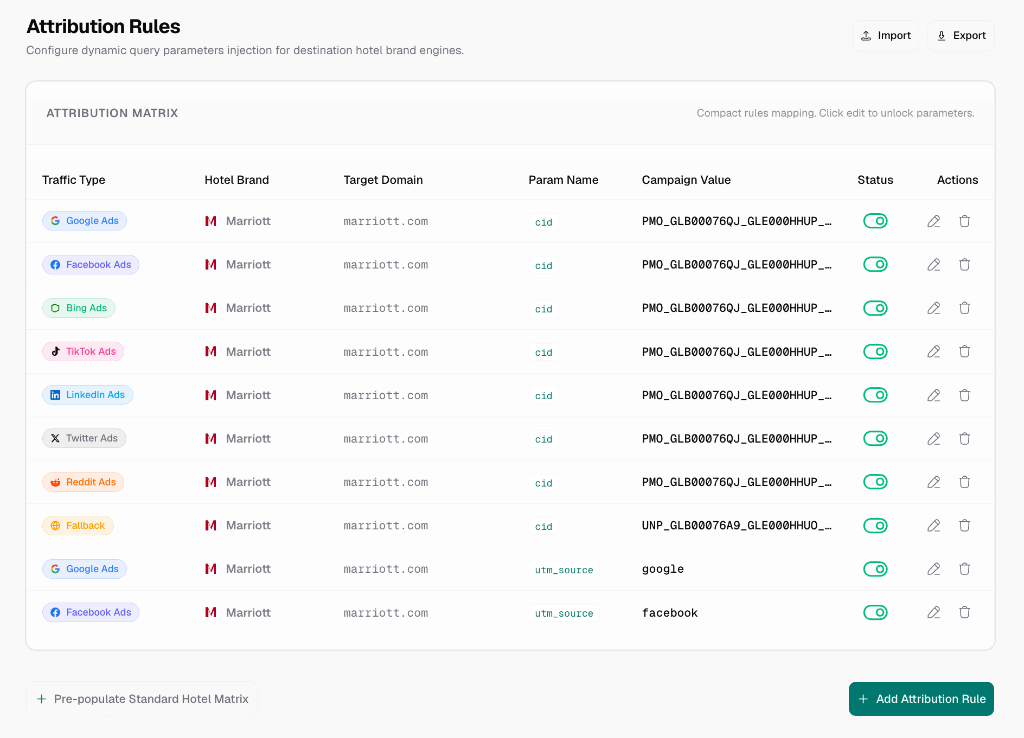
Brand Rule Templates
For convenience, Cogwheel Attribute includes pre-configured brand templates (supporting Marriott, Hilton, Hyatt, etc.). You only need to input your specific campaign or source IDs.
1. Google Ads Template
- Trigger Conditions:
- URL contains
gclid,gad_source,gbraid, orwbraid - OR
utm_sourceequalsgoogleANDutm_mediumequalscpc
- URL contains
- Default Actions:
- Appends the brand's tracking parameter with your campaign identifier:
- Marriott: Appends
cidwith your Google AdsPMO_SCID. - Hilton: Appends
WT.mc_idwith your Google Ads campaign ID. - Hyatt: Appends
srcwith your Google Ads source code.
- Marriott: Appends
- Target outbound links matching the respective brand domain (e.g.,
marriott.com,hilton.com,hyatt.com).
- Appends the brand's tracking parameter with your campaign identifier:
- Recommendation: Place this rule near the top of your stack.
2. Meta Ads (Facebook & Instagram) Template
- Trigger Conditions:
- URL contains
fbclidorcft - OR
utm_sourceequalsfacebook(orinstagram/ig) ANDutm_mediumequalspaid_social(orcpc/ads)
- URL contains
- Default Actions:
- Appends the brand's tracking parameter with your campaign identifier (e.g., Marriott
cid/PMO_SCID, HiltonWT.mc_id, or Hyattsrc). - Target outbound links matching the respective brand domain.
- Appends the brand's tracking parameter with your campaign identifier (e.g., Marriott
3. Microsoft/Bing Ads Template
- Trigger Conditions:
- URL contains
msclkid - OR
utm_sourceequalsbingANDutm_mediumequalscpc
- URL contains
- Default Actions:
- Appends the brand's tracking parameter with your campaign identifier.
- Target outbound links matching the respective brand domain.
4. Unpaid Referrer / Fallback Template
- Trigger Conditions:
- Catch-all (fires if no paid parameters are found in the visitor's session).
- Default Actions:
- Appends the brand's tracking parameter with your unpaid campaign identifier (e.g., Marriott
UNP_SCID). - Target outbound links matching the respective brand domain.
- Appends the brand's tracking parameter with your unpaid campaign identifier (e.g., Marriott
- IMPORTANT: This catch-all rule must reside at the very bottom of the priority list. If it is placed at the top, it will match all traffic and bypass your paid templates.
Custom Rules (UTM & Query String)
If you use custom UTM setups or non-Marriott booking engines, you can build rules from scratch:
- Click New Rule -> Create from Scratch.
- Define Conditions: Combine rows using
AND/ORlogic:- Parameter Matching: Match query variables (e.g.,
utm_campaign,source). - Page Context: Match current page path or hostname.
- Referrer: Match specific domains (e.g.,
tripadvisor.com).
- Parameter Matching: Match query variables (e.g.,
- Define Actions:
- Append URL Parameter: Appends custom key-value pairs (e.g.,
utm_source=vanity). - Inject Hidden Input: Adds inputs to matching form submissions.
- Set DOM Attribute: Sets custom HTML attributes (e.g.,
data-attribution="social").
- Append URL Parameter: Appends custom key-value pairs (e.g.,
- Specify Targets: Restrict rules to certain outbound links using
URL containsor CSS selectors.
Reference: Condition Fields & Brand Mappings
Traffic Source Condition Fields
When building custom conditions, Cogwheel Attribute provides preset boolean fields representing detected traffic sources:
| Condition Field | Matches Session When... |
|---|---|
google_ads_session | Landing URL contains gclid, gad_source, gbraid, wbraid, or utm_source=google + utm_medium=cpc. |
meta_ads_session | Landing URL contains fbclid, cft, or utm_source=facebook/instagram + utm_medium=paid_social/cpc. |
bing_ads_session | Landing URL contains msclkid or utm_source=bing + utm_medium=cpc. |
tiktok_ads_session | Landing URL contains ttclid or utm_source=tiktok. |
linkedin_ads_session | Landing URL contains li_fat_id or utm_source=linkedin. |
twitter_ads_session | Landing URL contains twclid or utm_source=twitter/x. |
reddit_ads_session | Landing URL contains rdt or utm_source=reddit. |
fallback_session | Catch-all for any session that does not match any paid search/social presets. |
Hotel Brand Parameters
The application features native presets to map rules to specific booking domains. Outbound links targeting these domains automatically receive the associated parameter name:
- Marriott: Targets
marriott.comusing parametercid(typically carrying an SCID). - Hilton: Targets
hilton.comusing parameterWT.mc_id. - Hyatt: Targets
hyatt.comusing parametersrc(typically carrying a concatenated Hyatt source code). - IHG: Targets
ihg.comusing parametercm_mmc. - Wyndham: Targets
wyndhamhotels.comusing parameterCID. - Choice: Targets
choicehotels.comusing parametermc.