Campaign Builder
How to construct UTM and Hyatt tracking links and auto-map them to attribution rules
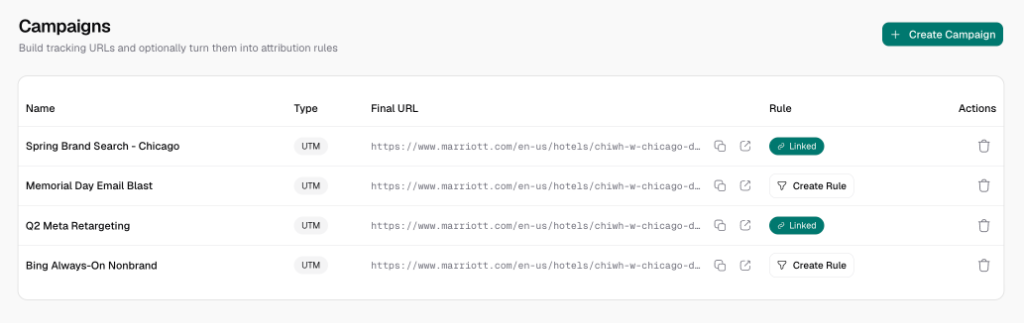
The Campaigns workspace allows marketing teams to build tracking links and automatically connect them to our dynamic link-rewriting rules engine.
1. Overview of the Campaign Portal
Under any project workspace, navigate to the Campaigns tab. This interface serves two purposes:
- Link Builder: Standardizes and formats your marketing URLs (either standard UTMs or brand-specific parameters).
- Rule Linkage: Enables automatic rule generation. When a campaign is saved, Cogwheel can auto-generate a matching rule in the background so that any visitor landing from that campaign has their booking links correctly rewritten.
2. UTM Campaign Builder
For general digital marketing channels (such as email newsletters, guest blogs, or social media posts), use the UTM Campaign Builder:
- Click New Campaign -> UTM Campaign.
- Configuration Fields:
- Campaign Name: An internal reference label (e.g.,
Summer Newsletter 2026). - Destination URL: The landing page on your vanity website (e.g.,
https://www.vanityresort.com/offers). - Campaign Source (
utm_source): The specific platform driving traffic (e.g.,newsletter,google). - Campaign Medium (
utm_medium): The marketing channel type (e.g.,email,cpc). - Campaign Name (
utm_campaign): The campaign promo name (e.g.,summer_sale). - Campaign Term (
utm_term): Used for search keywords (optional). - Campaign Content (
utm_content): Used to differentiate link versions or creative styles (optional).
- Campaign Name: An internal reference label (e.g.,
- URL Generation: The builder automatically appends the variables to construct the Final URL, which you can copy for your campaigns.
3. Hyatt Src Campaign Builder
Unlike other hotel brands that use standard campaign IDs, Hyatt utilizes a specific, structured src tracking parameter. Cogwheel Attribute includes a built-in Hyatt Src Creator that ensures your codes follow Hyatt's corporate tracking standards.
How Hyatt's src Code is Structured
Hyatt's src parameter is constructed by concatenating lowercase codes from several options separated by underscores (_):
src = executor_agencyOrRegion_language_tactic_brand_customThe Hyatt Src Builder allows you to select options from standard dropdown menus:
- Executor:
- Agency (
agn) - Corporate (
corp) - Property (
prop)
- Agency (
- Agency/Region:
- If Executor is Agency, select from standard agencies: Screen Pilot (
scrpil), Cendyn (cdyn), BCV (bcv), or Other (oth). - Otherwise, enter your property's 5-letter Hyatt Spirit Code (e.g.,
YOUR_PROPERTY_CODE).
- If Executor is Agency, select from standard agencies: Screen Pilot (
- Language: Select your target audience language (e.g., English ->
en, Spanish ->es, Japanese ->ja). - Tactic: Pre-configured based on the channel (e.g.,
ppc,social,meta). - Brand: Choose your Hyatt brand sub-category (e.g., Alila ->
alila, Thompson ->thompson, Park Hyatt ->park, Unbound Collection ->unbound).
Example Generated Hyatt Parameter:
src=agn_scrpil_en_ppc_thompson_summer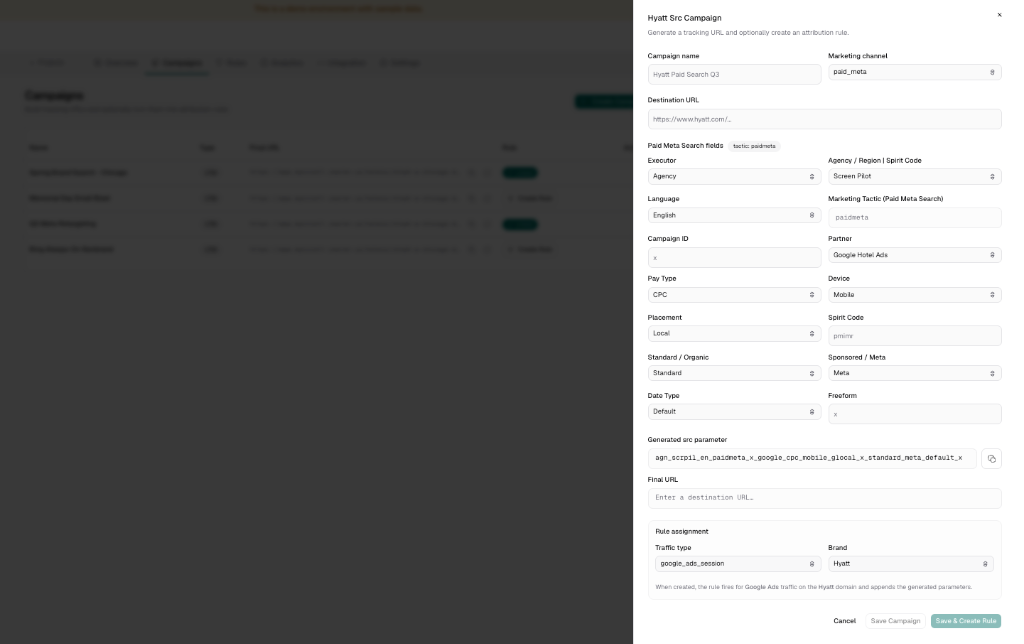
4. Connecting Campaigns to Rules
A key power of Cogwheel Attribute is the ability to instantly connect campaigns to dynamic attribution rules.
Inside the Campaign Creator, locate the Rule Assignment card:
- Create Associated Rule (Toggle):
- Turn this toggle ON to automatically register an attribution rule in the rules engine.
- Turn this toggle OFF if you only want to generate the link and copy it manually (e.g., for newsletters without custom link rewriting rules).
- Traffic Type: Define which visitor session matches this campaign. This corresponds to the traffic-source condition checked by the client-side widget:
- Google Ads (
google_ads_session) - Facebook Ads (
meta_ads_session) - Bing Ads (
bing_ads_session) - TikTok Ads (
tiktok_ads_session) - LinkedIn Ads (
linkedin_ads_session) - Fallback (
fallback_session- triggers for all non-paid traffic)
- Google Ads (
- Hotel Brand: Select which booking engine domain should be rewritten when this campaign matches:
- Marriott (
cidparameter onmarriott.com) - Hilton (
WT.mc_idparameter onhilton.com) - Hyatt (
srcparameter onhyatt.com) - IHG (
cm_mmcparameter onihg.com) - Wyndham (
CIDparameter onwyndhamhotels.com) - Choice (
mcparameter onchoicehotels.com) - Custom (allows specifying any custom domain and parameter name)
- Marriott (
Upon saving, Cogwheel will automatically generate a rule named [Campaign Name] - [Brand] ([Traffic Type]) and add it to your rules list.